
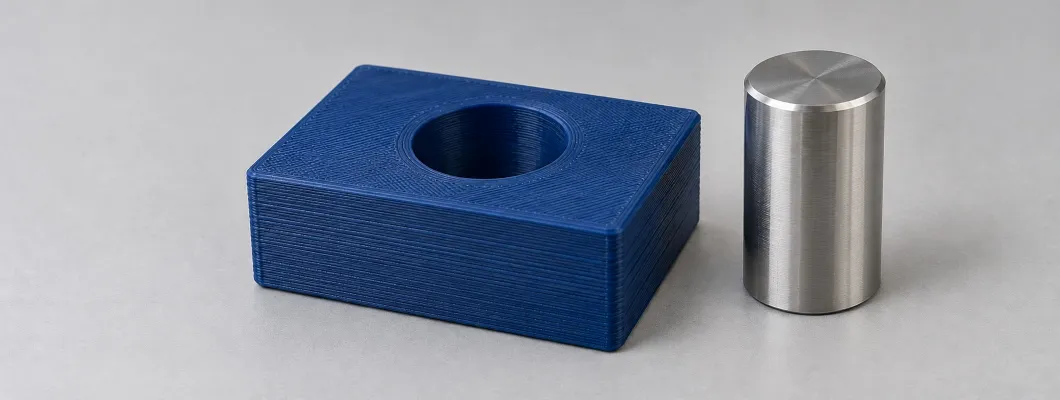
You have designed a bracket, the print looks good and the dimensions seem reasonable. Yet the shaft will not go in. Or it goes in and feels too loose. Before changing the scale of the model, ask one practical question: which features need to fit, and what allowance does their function require?
For a useful fit in FDM 3D printing, define the function, identify the critical dimensions and test a sample using the material and orientation intended for the part. Nozzle diameter and layer height describe aspects of the process, but neither determines the final dimensional tolerance on its own.
Jump to a section
1. Tolerance and clearance: keep the two separate
The nominal dimension is the design reference. A tolerance specifies how far a dimension may deviate from that reference and remain acceptable. A 20.00 ± 0.10 mm shaft allows diameters from 19.90 to 20.10 mm. The full interval is 0.20 mm wide; “±0.10” is half that width.
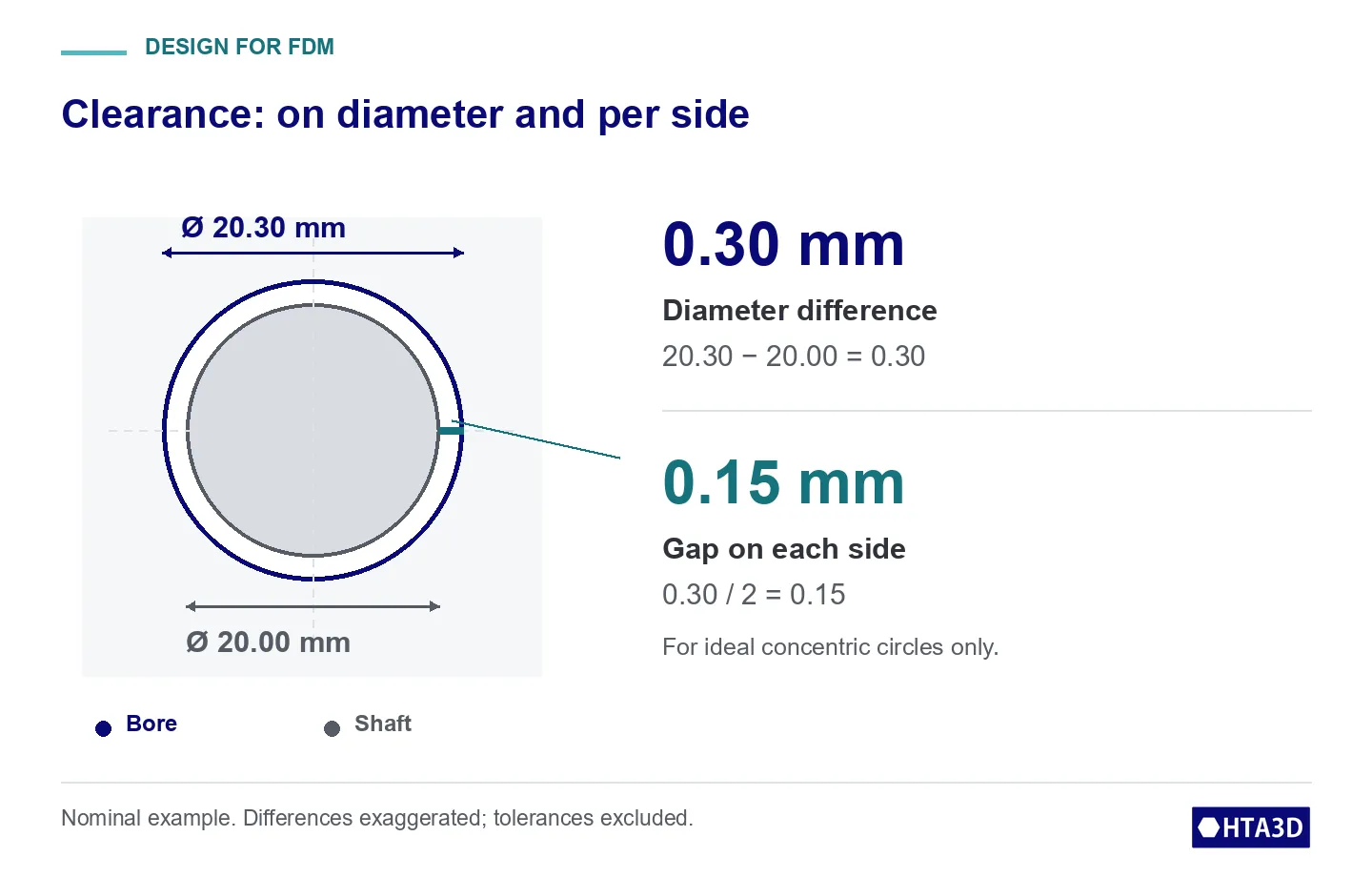
Clearance is the size difference between mating components. For a shaft and a hole, we subtract the shaft diameter from the bore diameter. This is diametral clearance. For ideal, concentric circles, the gap on each side would be half that difference.
An instrument reading is different again: it estimates the actual dimension under stated conditions. A caliper displaying hundredths of a millimetre does not necessarily verify every requirement expressed in hundredths. Its resolution, condition, contact method and the geometry being measured all affect the check.
Also separate being close to the target from producing similar results repeatedly. Several parts may be nearly identical yet all fall outside the drawing limits. One sample that fits does not prove an entire batch will fit.
2. Clearance, interference and transition fits
These names describe the relationship between the permitted size limits of the shaft and housing:
- Clearance fit: the bore leaves room for the shaft throughout the permitted size combinations. If minimum clearance is zero, contact is possible at that limit.
- Interference fit: the shaft is larger than the bore throughout the combinations. Zero interference at a limit allows contact. Assembly requires considering deformation and the loads the components can withstand.
- Transition fit: some combinations leave clearance and others produce interference. Two pairs of components meeting their dimensions can assemble differently.
A negative “bore − shaft” value indicates dimensional interference. It is not a physical negative gap and does not calculate assembly force. Finish, form and alignment matter too: a positive diameter difference alone does not guarantee smooth sliding.
3. Visualise the fit before choosing the dimensions
Explore a nominal 20 mm shaft. Change the nominal diameter difference and the symmetrical tolerances of both components. The bands show permitted sizes; the hatched area appears where the intervals share possible diameters. It does not represent the proportion of parts that will fit.
How much allowance is left for the fit?
Move the sliders. Nominal shaft size is 20 mm; differences are explored on diameter.
Static example: shaft 20.00 ± 0.10 mm, bore 20.30 ± 0.10 mm. Minimum diametral clearance 0.10 mm and maximum 0.50 mm. Interaction needs JavaScript; the example and procedure remain available.
The hole leaves room throughout the permitted size combinations.
Component schematics: differences exaggerated, not a dimensional scale.
Diameter limits on the same scale (mm)
Hatching: diameters shared by both intervals.
The intervals do not share any diameters.
Educational model: symmetrical tolerances and ideal dimensions. A negative value means interference. It does not verify form, finish, assembly force or printing capability.
An example: 0.30 mm nominal clearance can vary
With a 20.00 ± 0.10 mm shaft and a 20.30 ± 0.10 mm bore, nominal clearance is 0.30 mm. The tightest combination pairs the smallest hole with the largest shaft: 20.20 − 20.10 = 0.10 mm. The loosest pairs 20.40 − 19.90 = 0.50 mm.
If the bore becomes 20.10 ± 0.10 mm with the same shaft, the difference can range from −0.10 to +0.30 mm. This is a transition fit, even though the nominal sizes still leave 0.10 mm. Use the tool’s example buttons to compare both cases and an interference fit.
These are hypothetical examples. The tolerances entered are design requirements, not demonstrated capabilities of your printer. Before relying on them, establish that the process and measurement method can support the stated limits.
4. Design the functional features, not just the outside shape
Identify the surfaces that support, guide, rotate or retain. For a bracket, bore diameter and its position relative to mounting screws may matter while an external face allows more variation. Specifying the same tight tolerance everywhere can add work without improving function.
The nozzle affects details that can be formed from extruded lines. However, a 0.4 mm nozzle does not make every part dimension “±0.4 mm”. Final size combines toolpaths, extrusion, geometry and material behaviour.
A small entry chamfer can help present mating parts to each other; it cannot fix incompatible diameters. Check exported curves too: a circle that looked smooth in CAD may reach the slicer as a polygon. Inspect the mesh before blaming the printer.
Orientation changes the surface you are manufacturing
In a vertical-axis hole, each layer forms the circumference in its own plane. A horizontal hole introduces overhangs, bridging or supports in its upper region. Consider the finish there together with load direction, access and other critical surfaces.
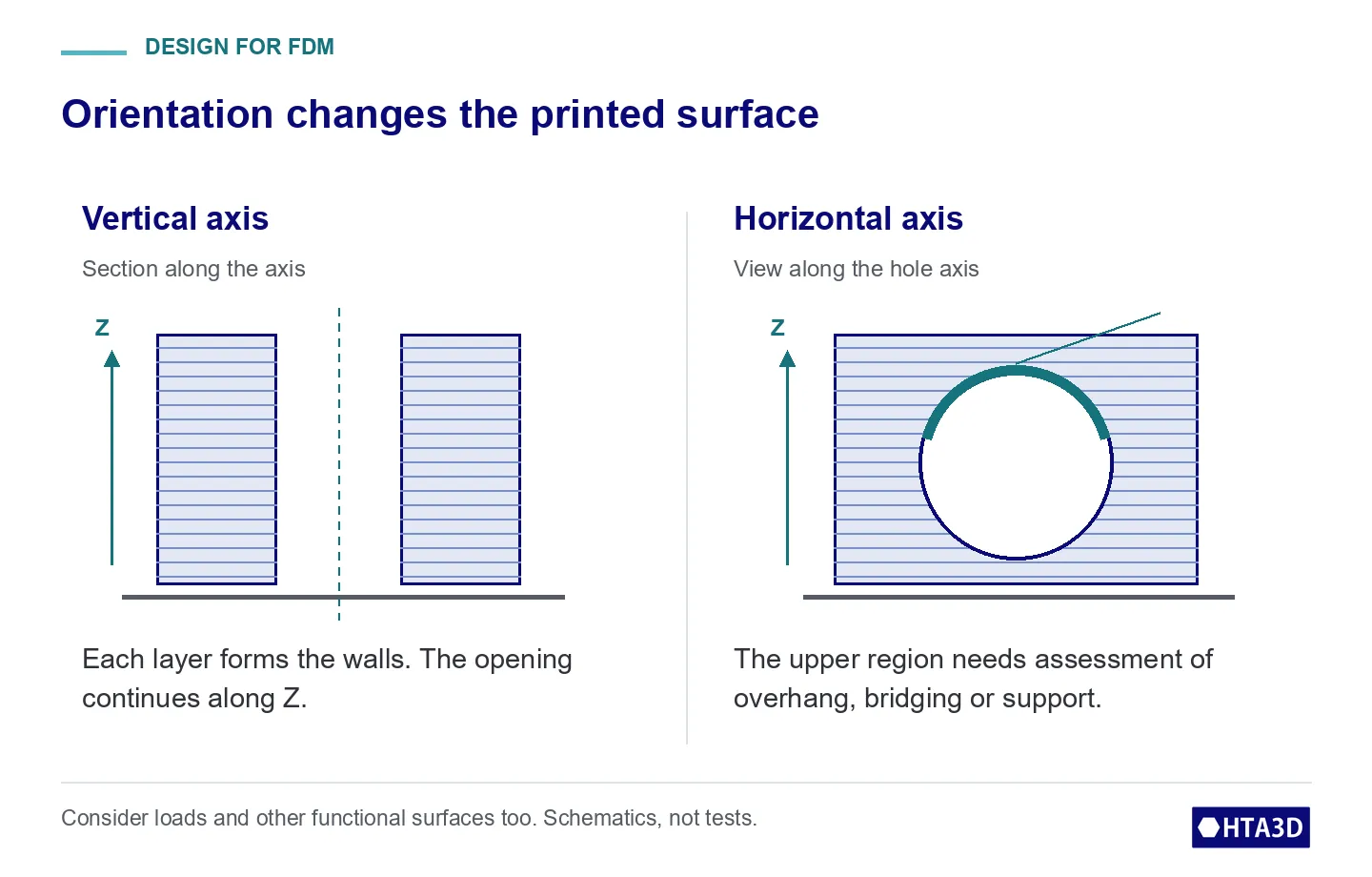
A teardrop profile or modified upper region may help a cable passage or an access opening. A housing intended to support a shaft or bearing needs its specified functional geometry. Changing a shape to print better also requires checking its effect on assembly.
Leave adequate material around features that carry loads or receive finishing. Wall thickness, ribs and transitions should reflect the intended use; a completely solid fill does not replace this design review.
5. Find where the dimensional difference occurs
Thermal distortion and shrinkage depend on material and process, but a part that does not fit does not automatically need a global scale percentage. Distinguish external sizes, holes, the region next to the bed and surfaces supported during printing.
- Only the entry near the bed fails: inspect the first layer for a flared edge. PrusaSlicer’s elephant foot compensation targets that layer. Check the cause first and test the correction in your profile; do not copy a fixed value as a universal solution.
- A hole is off-size while the outside contour is correct: inspect that geometry, its toolpath and finish before scaling the whole part. A global change will also move centre distances and dimensions that may already be correct.
- Extrusion is inconsistent: resolve it before tuning dimensions. Our FDM jam guide provides an order for checking feed and volumetric demand.
Change one important variable at a time and measure again. Do not reduce flow simply to enlarge a hole without checking the consequences for other walls and the part itself.
6. A useful sample before printing the batch
For a large part, start with a local sample retaining the bore, surrounding walls and intended printing conditions. It is an economical first check; if the complete part has different heat distribution, distortion or loading, validate the full assembly afterwards.
- Define the requirement: what must assemble, whether it must move or retain, and the dimensional interval or functional criterion you accept.
- Keep relevant conditions: identified material, orientation, settings, supports and wall thickness around the fit. Record the file and profile versions.
- Prepare the measurement: let the part stabilise under agreed conditions; remove supports and burrs outside the evaluated surface. Record where and how you will measure.
- Measure and test assembly: check different locations when looking for ovality or taper. For demanding dimensions, choose a method suitable for the geometry and decision; a caliper reading may not be enough.
- Check several parts when consistent production matters: repeat readings on one sample do not establish manufacturing variation. Choose the sample quantity according to the requirement and process.
- Revise and validate: if it fails, change the identified cause. Retain previous measurements and confirm the effect before extending the change to a batch.
7. When to plan finishing after printing
Printing can create the overall shape while a later operation finishes a critical hole, for example by boring or reaming it. This strategy must be planned and validated for the material, geometry and equipment available; it does not guarantee a particular level of precision on its own.
If you plan such finishing, allow for the material to be removed, continuous material around the bore, tool access, workholding and inspection references. A finishing tool should not encounter an inadequate wall or a feature that deforms when clamped.
A drill alone does not guarantee diameter, position, concentricity or finish. A drawing dimension specified in hundredths does not become feasible simply by adding “machine afterwards”: review the complete process, including inspection.
Agree the scope of subsequent operations with the manufacturer. HTA3D can review your file and requirements through printing, modelling or design services; machining and a specific tolerance will be included only when expressly confirmed in the quoted work.
8. What to send when requesting a part that must fit
Along with the file, attach a drawing or dimensioned sketch showing functional dimensions, limits and important references. Explain the mating component, how the assembly is used and what you will check for acceptance. Include quantity, environment, material if defined, and finishing requirements.
Before manufacturing, let’s review what needs to fit
If you have a model, send your file and critical dimensions for a printing assessment. For geometry changes, consider our 3D modelling service; if the solution and assembly still need defining, our product design and development service. Scope and acceptance criteria are agreed before manufacturing.
Save this sheet for your next part
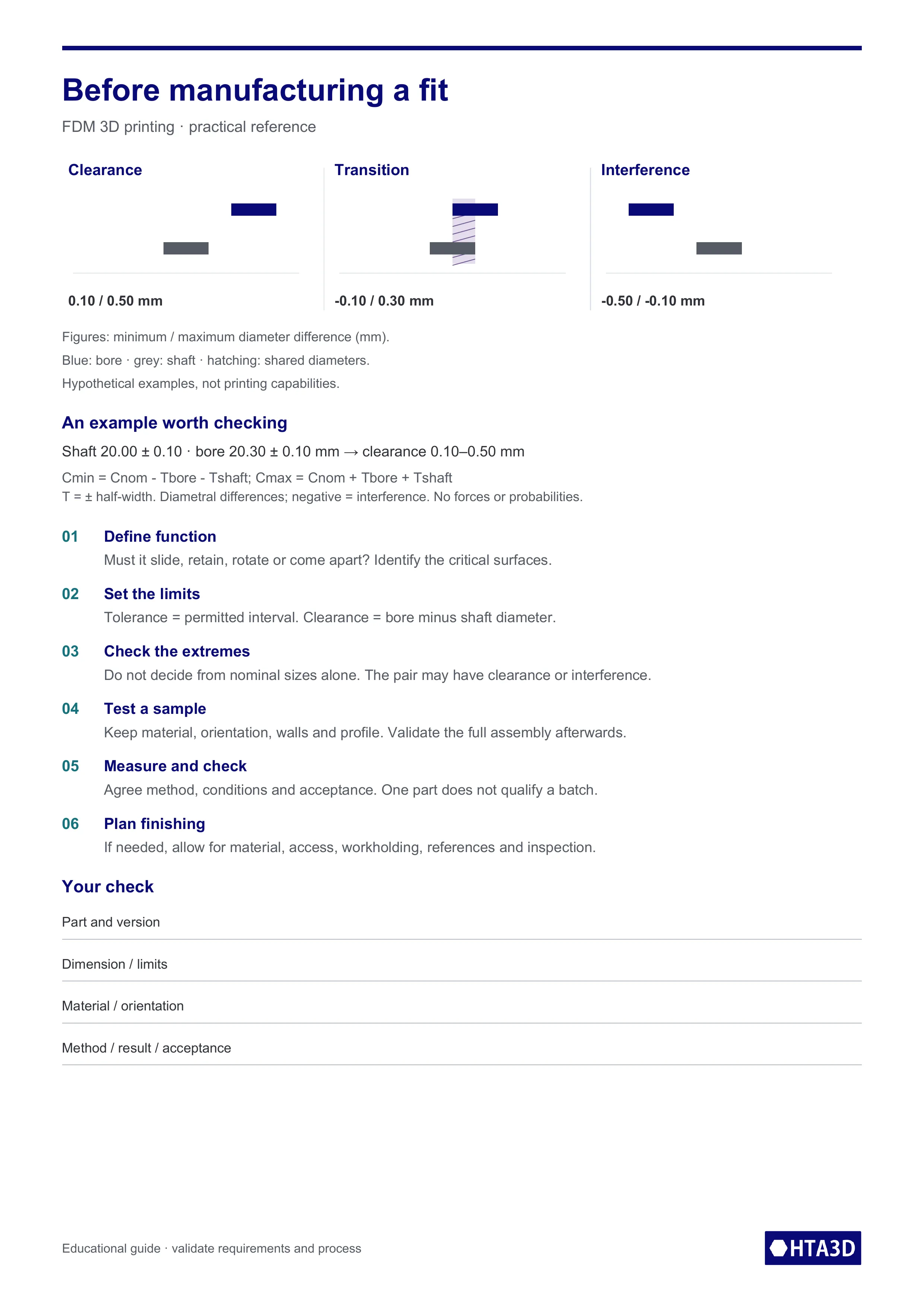
Use the sheet as a reminder and to record your fit requirement. It includes tolerance versus clearance, the example formulas and the checks before producing a batch.
Download A4 reference sheet (PDF)View the sheet as an image
Technical references and scope of the examples
JTEKT: types of fit; JCGM VIM for precision and measurement uncertainty. Accessed 13 October 2026. Numerical examples and diagrams are our own educational illustrations, not manufacturing results or guaranteed capabilities. The tool analyses symmetrical size intervals; it does not assign ISO classes or calculate forces, probabilities or uncertainty.
Related Products

Leave a Comment